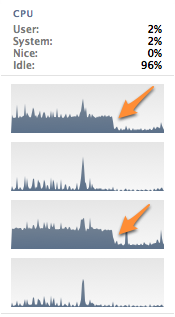
USB / cups process load on Mac OSX. Just Unplugged HP OfficeJet 4575 and what happened, 30% CPU free on 2 threads:
Add comment June 14th, 2012
USB / cups process load on Mac OSX. Just Unplugged HP OfficeJet 4575 and what happened, 30% CPU free on 2 threads:
Add comment June 14th, 2012
Add comment October 6th, 2010
Add comment October 2nd, 2010
Tribuna do Norte | Dilma defende digitalização dos serviços públicos para reduzir gastos do governo.
Segundo a ministra, com a informatização fica mais fácil controlar e fiscalizar a máquina pública. “Imaginem um serviço de saúde que nós tivéssemos um cartão único e uma rede única centralizada em todo o Brasil. Nós saberíamos quantas vezes uma pessoa fez tomografia, se ela está fazendo tomografia demais ou não”, exemplificou.
Agora Imagine esse exemplo:
Um site que busca no Tribunal de Contas do Estado todas os gastos públicos. Nessa base só tem o valor da obra e o nome da empresa que a executa. Esse mesmo site busca no sistema do governo do Estado os detalhes e endereços de todas as licitações e o seu andamento.
Juntando essas informações o site mostra um mapa da cidade com todos os pontos onde existem obras, qual foi a licitação, com cores diferentes para as obras de maior valor e uma barrinha pra dizer em que estágio está a obra. O mapa ainda poderia ser filtrado por obras de infra-estrutura, telecomunicações, saneamento, novas construções, recuperações. Agora imagine fazer isso numa linha do tempo e comparar graficamente o período de um governo com o período de outro? Ver quais regiões da cidade recebem mais recursos? Quais regiões têm obras conflitantes (pavimentar primeiro e depois abrir p/ sanear e depois pavimentar de novo). Já pensou dar “Play” num filminho que mostre o crescimento da sua cidade como se você estivesse assistindo uma partida de SimCity?
Agora imagine qualquer pessoa poder clicar num desses pontos do mapa e adicionar uma foto, mostrando que a obra não está andando como está registrado? E adicionar um comentário sobre os transtornos e incoerências da obra? Sabe quem é a melhor pessoa para fazer isso? Quem mora ou trabalha perto desses locais. É a própria população contribuindo na fiscalização e controle dos gastos públicos.
Minha idéia é relativamente simples, totalmente inspirado em Wikinomics e o Gapminder de Hans Rosling:
Transformar todos os sistemas de informação públicos em uma grande plataforma de colaboração. Como? Todo site ou sistema teria uma saída padrão dos seus dados públicos para consulta por qualquer outro sistema que quisesse acesso a esses dados.
Dessa forma qualquer outro sistema desenvolvido teria um protocolo comum que serviria para buscar informações em sistemas governo, cruzar essas informações da maneira que achasse melhor e criar uma nova visão desses dados nunca antes imaginada pelos órgãos que possuem os dados originais.
Hoje cada órgão libera suas informações do jeito que achar mais conveniente. Um coloca uma página que você tem de se cadastrar, outro gera um arquivo PDF, ou tro tem um sistema de busca horrível, e por aí vai. Se você quiser por exemplo acompanhar licitações na sua cidade não existe outra opção senão baixar um arquivo PDF e dar um Ctrl + F. Para uma empresa automatizar esse processo tem de gerar um leitor de PDF, uma gambiarra enorme e desnecessária.
O governo podia se inspirar em plataformas como o RDS da Amazon e prover acesso fácil e padronizado à toda a base de dados públicos dos órgãos do governo. O resultado disso é imprevisível, pois existindo uma plataforma desse abre-se um universo de possibilidades do que se pode fazer com esses dados.
3 comments January 23rd, 2010
 del.icio.us